

Free Overlay is a versatile video editing resource designed for video editors, filmmakers, motion designers, photographers, and content creators who want to enhance their footage with creative visual elements. This Free After Effects resource provides a starting point for exploring different overlay styles that can add texture, atmosphere, depth, and visual interest to video projects. Overlays are widely used in modern video production to transform ordinary footage into more engaging and visually expressive content.
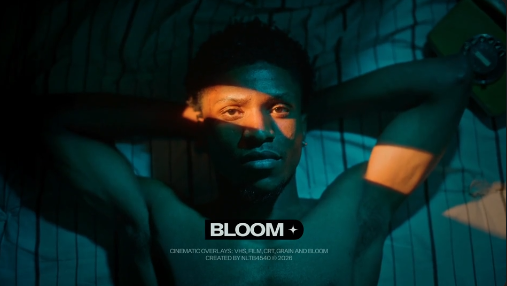
Video overlays are visual elements placed over existing footage to introduce additional effects, textures, patterns, lighting, or graphic details. Depending on the overlay style, they can create cinematic atmospheres, vintage film looks, subtle visual enhancements, dynamic compositions, or artistic effects. Free Overlay can serve as a useful creative resource for editors who want to experiment with different visual treatments and develop a distinctive style for their projects.
Content creators can use video overlays for YouTube videos, Instagram Reels, TikTok videos, YouTube Shorts, Facebook Reels, and other social media content. Add visual elements to travel vlogs, lifestyle videos, gaming edits, music videos, tutorials, product showcases, and creative montages. Overlays can help establish a consistent aesthetic across multiple clips and make short-form videos more visually engaging when used appropriately.
Filmmakers and video editors can incorporate overlays into cinematic sequences, short films, documentaries, trailers, promotional videos, and storytelling projects. Different overlay styles can help establish a mood, emphasize a scene, or create visual continuity between shots. Combine overlays with carefully selected footage, color grading, transitions, and sound design to create a polished result that supports the narrative.
Photographers and creative professionals can use overlay effects in photo slideshows, portrait videos, wedding films, fashion edits, photography portfolios, and editorial presentations. Texture-based overlays can add visual character, while light-inspired elements can create a softer or more atmospheric appearance. When applied thoughtfully, these effects can complement the original images without distracting from the subject.
Brands and businesses can use Free Overlay as inspiration for promotional videos, product advertisements, corporate presentations, brand films, and digital marketing campaigns. Visual overlays can help establish a recognizable design style across different campaign assets. Combine them with logos, typography, product footage, branded colors, and animated graphics to create consistent promotional content for websites and social media platforms.
Music video editors and motion designers can explore overlay effects for lyric videos, artist promotions, concert recaps, performance edits, visualizers, and beat-driven montages. Layering complementary visual elements over footage can add depth and movement to a sequence. Pair the effects with rhythmic editing, suitable music, and balanced color grading to create a more immersive viewing experience.
Gaming creators and streamers can use overlay graphics in gaming highlights, gameplay montages, channel promotions, reaction videos, and branded content. Depending on the style of the asset, overlays can complement futuristic interfaces, energetic edits, glitch-inspired visuals, or cinematic gaming footage. Keep important gameplay details and on-screen text visible so that the visual effects enhance rather than obstruct the content.
Freelance video editors, motion designers, and creative agencies can use overlays as part of their everyday editing workflow. They are useful for client advertisements, event highlights, social media campaigns, portfolio videos, promotional films, and branded presentations. Reusable overlay assets can help editors explore different creative directions while maintaining visual consistency across multiple projects.
Adobe After Effects offers a flexible environment for combining overlay elements with video footage, typography, backgrounds, and other motion graphics. Depending on the original asset's format and features, you may be able to adjust opacity, blend modes, color, positioning, scale, and timing to achieve the desired look. Always check the original asset specifications for supported software versions, required plugins, file formats, and available customization options.
For the best results, choose overlays that complement the content and visual style of your project. Subtle textures can add depth without overwhelming the footage, while more prominent effects can be useful for music videos, creative montages, and stylized promotional content. Adjust opacity and blending where supported, maintain readable text, and ensure that important subjects remain visible. A balanced approach will help your video look intentional and professional.
Free Overlay can also be a useful starting point for experimenting with layered compositions, cinematic treatments, abstract visuals, creative transitions, and motion graphics. Whether you are producing a short film, editing a travel vlog, designing a product advertisement, creating a music video, or preparing social media content, overlay effects offer many possibilities for enhancing your visual storytelling.
Whether you are a beginner learning video editing or an experienced professional developing a new creative style, Free Overlay provides a starting point for exploring visual effects and improving your projects. Explore more Free After Effects templates, video overlays, cinematic effects, motion graphics, and creative editing resources on Freevideofx to discover assets for your next production.
Video overlays are visual elements placed over existing footage to introduce additional effects, textures, patterns, lighting, or graphic details. Depending on the overlay style, they can create cinematic atmospheres, vintage film looks, subtle visual enhancements, dynamic compositions, or artistic effects. Free Overlay can serve as a useful creative resource for editors who want to experiment with different visual treatments and develop a distinctive style for their projects.
Content creators can use video overlays for YouTube videos, Instagram Reels, TikTok videos, YouTube Shorts, Facebook Reels, and other social media content. Add visual elements to travel vlogs, lifestyle videos, gaming edits, music videos, tutorials, product showcases, and creative montages. Overlays can help establish a consistent aesthetic across multiple clips and make short-form videos more visually engaging when used appropriately.
Filmmakers and video editors can incorporate overlays into cinematic sequences, short films, documentaries, trailers, promotional videos, and storytelling projects. Different overlay styles can help establish a mood, emphasize a scene, or create visual continuity between shots. Combine overlays with carefully selected footage, color grading, transitions, and sound design to create a polished result that supports the narrative.
Photographers and creative professionals can use overlay effects in photo slideshows, portrait videos, wedding films, fashion edits, photography portfolios, and editorial presentations. Texture-based overlays can add visual character, while light-inspired elements can create a softer or more atmospheric appearance. When applied thoughtfully, these effects can complement the original images without distracting from the subject.
Brands and businesses can use Free Overlay as inspiration for promotional videos, product advertisements, corporate presentations, brand films, and digital marketing campaigns. Visual overlays can help establish a recognizable design style across different campaign assets. Combine them with logos, typography, product footage, branded colors, and animated graphics to create consistent promotional content for websites and social media platforms.
Music video editors and motion designers can explore overlay effects for lyric videos, artist promotions, concert recaps, performance edits, visualizers, and beat-driven montages. Layering complementary visual elements over footage can add depth and movement to a sequence. Pair the effects with rhythmic editing, suitable music, and balanced color grading to create a more immersive viewing experience.
Gaming creators and streamers can use overlay graphics in gaming highlights, gameplay montages, channel promotions, reaction videos, and branded content. Depending on the style of the asset, overlays can complement futuristic interfaces, energetic edits, glitch-inspired visuals, or cinematic gaming footage. Keep important gameplay details and on-screen text visible so that the visual effects enhance rather than obstruct the content.
Freelance video editors, motion designers, and creative agencies can use overlays as part of their everyday editing workflow. They are useful for client advertisements, event highlights, social media campaigns, portfolio videos, promotional films, and branded presentations. Reusable overlay assets can help editors explore different creative directions while maintaining visual consistency across multiple projects.
Adobe After Effects offers a flexible environment for combining overlay elements with video footage, typography, backgrounds, and other motion graphics. Depending on the original asset's format and features, you may be able to adjust opacity, blend modes, color, positioning, scale, and timing to achieve the desired look. Always check the original asset specifications for supported software versions, required plugins, file formats, and available customization options.
For the best results, choose overlays that complement the content and visual style of your project. Subtle textures can add depth without overwhelming the footage, while more prominent effects can be useful for music videos, creative montages, and stylized promotional content. Adjust opacity and blending where supported, maintain readable text, and ensure that important subjects remain visible. A balanced approach will help your video look intentional and professional.
Free Overlay can also be a useful starting point for experimenting with layered compositions, cinematic treatments, abstract visuals, creative transitions, and motion graphics. Whether you are producing a short film, editing a travel vlog, designing a product advertisement, creating a music video, or preparing social media content, overlay effects offer many possibilities for enhancing your visual storytelling.
Whether you are a beginner learning video editing or an experienced professional developing a new creative style, Free Overlay provides a starting point for exploring visual effects and improving your projects. Explore more Free After Effects templates, video overlays, cinematic effects, motion graphics, and creative editing resources on Freevideofx to discover assets for your next production.


