

Free Search Screen Pro – Typing Animation is a modern interface animation concept designed for video editors, motion designers, UI designers, developers, and content creators who want to demonstrate search interactions through engaging animated visuals. This Free After Effects template provides a creative starting point for presenting search bars, typing effects, text input animations, and search screen interactions in promotional videos, software demonstrations, tutorials, and digital product presentations.
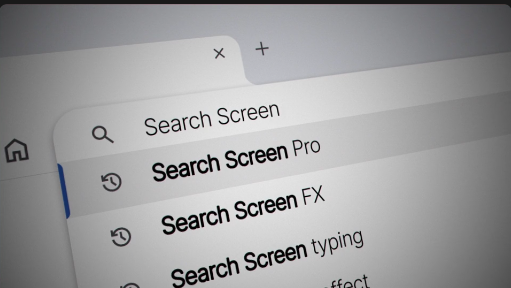
Search interfaces are an essential part of websites, mobile applications, software platforms, and digital services. Animated search screens can demonstrate how users enter queries, explore information, and interact with digital products. With Free Search Screen Pro – Typing Animation, creators can develop visual sequences that communicate these interactions clearly while adding movement and structure to their videos.
This Free After Effects resource is suitable for website presentations, mobile app promotions, SaaS product demonstrations, software explainers, technology advertisements, and user interface showcases. Use typing animations to demonstrate search functionality, introduce a feature, display a sample query, or guide viewers through a digital workflow. Combining a search interface with animated text and carefully timed movements can help make technical information easier to understand.
UI and UX designers can use search screen animations in portfolio presentations, interface case studies, design walkthroughs, prototype demonstrations, and product concept videos. A typing effect can illustrate how a user enters a query, while the surrounding interface can communicate the structure and functionality of a digital product. These animations can help designers present interaction concepts more effectively to clients, stakeholders, and development teams.
Web developers and software companies can incorporate Free Search Screen Pro – Typing Animation into product launch videos, feature announcements, landing page presentations, application demonstrations, and technical tutorials. Show a user searching for content, finding a result, or exploring a specific feature to make the product experience easier to follow. The animation can also support presentations for search tools, productivity platforms, online directories, digital marketplaces, and content discovery applications.
AI product creators can use typing animation concepts to demonstrate prompt inputs, AI-powered search interfaces, chatbot queries, knowledge discovery tools, and intelligent information retrieval workflows. A search bar with animated text can introduce a sample user request before transitioning to a result screen or product demonstration. Ensure that any displayed interface accurately represents the actual functionality of the product being promoted.
YouTube creators and educational content producers can use search screen animations for tutorials, technology reviews, software guides, online learning videos, and explainer content. The typing effect can demonstrate search queries, introduce a website, highlight a keyword, or show viewers how to locate specific information. These visual elements can also be incorporated into Instagram Reels, TikTok videos, YouTube Shorts, and other short-form educational content.
Brands and digital marketers can use search interface animations in promotional campaigns, product advertisements, digital marketing videos, and social media content. Demonstrate how customers discover products, explore services, or interact with an online platform. By combining animated search fields with brand colors, logos, typography, and relevant product visuals, businesses can create a consistent and professional presentation.
Freelance motion designers, video editors, and creative agencies can use Free Search Screen Pro – Typing Animation as a starting point for client projects involving interface demonstrations and technology-focused storytelling. Suitable applications include website explainers, app promotions, software presentations, online service advertisements, onboarding videos, and digital product launches. Reusable interface animation concepts can help streamline production while maintaining a clean and consistent visual style.
Adobe After Effects provides a flexible environment for creating animated text, interface elements, cursor movements, and screen-based motion graphics. Depending on the original template's features, you may be able to customize the search query, text appearance, colors, layout, timing, and other interface elements. Always check the original asset specifications for supported After Effects versions, required plugins, included files, and available customization options before using the template.
For the best results, keep the search interface simple and readable. Use realistic typing speeds, appropriate pauses, and clear text to make the interaction easy to follow. Ensure that the cursor, search field, and other interface elements remain visually consistent throughout the animation. Use a layout that complements the product's branding, and avoid unnecessary movements that could distract viewers from the main interaction.
Free Search Screen Pro – Typing Animation can also inspire the creation of animated search bars, browser interface demonstrations, app onboarding sequences, digital product explainers, and interactive-looking UI presentations. By combining typing effects with search results, icons, buttons, and other interface components, creators can build a more complete visual demonstration of a digital experience.
Whether you are promoting a website, demonstrating a mobile application, explaining a software feature, presenting an AI-powered tool, or creating an educational technology video, Free Search Screen Pro – Typing Animation offers a useful starting point for interface-focused motion graphics. Explore more Free After Effects templates, typing animations, search bar graphics, UI animations, and motion graphics resources on Freevideofx to discover creative assets for your next project.
Search interfaces are an essential part of websites, mobile applications, software platforms, and digital services. Animated search screens can demonstrate how users enter queries, explore information, and interact with digital products. With Free Search Screen Pro – Typing Animation, creators can develop visual sequences that communicate these interactions clearly while adding movement and structure to their videos.
This Free After Effects resource is suitable for website presentations, mobile app promotions, SaaS product demonstrations, software explainers, technology advertisements, and user interface showcases. Use typing animations to demonstrate search functionality, introduce a feature, display a sample query, or guide viewers through a digital workflow. Combining a search interface with animated text and carefully timed movements can help make technical information easier to understand.
UI and UX designers can use search screen animations in portfolio presentations, interface case studies, design walkthroughs, prototype demonstrations, and product concept videos. A typing effect can illustrate how a user enters a query, while the surrounding interface can communicate the structure and functionality of a digital product. These animations can help designers present interaction concepts more effectively to clients, stakeholders, and development teams.
Web developers and software companies can incorporate Free Search Screen Pro – Typing Animation into product launch videos, feature announcements, landing page presentations, application demonstrations, and technical tutorials. Show a user searching for content, finding a result, or exploring a specific feature to make the product experience easier to follow. The animation can also support presentations for search tools, productivity platforms, online directories, digital marketplaces, and content discovery applications.
AI product creators can use typing animation concepts to demonstrate prompt inputs, AI-powered search interfaces, chatbot queries, knowledge discovery tools, and intelligent information retrieval workflows. A search bar with animated text can introduce a sample user request before transitioning to a result screen or product demonstration. Ensure that any displayed interface accurately represents the actual functionality of the product being promoted.
YouTube creators and educational content producers can use search screen animations for tutorials, technology reviews, software guides, online learning videos, and explainer content. The typing effect can demonstrate search queries, introduce a website, highlight a keyword, or show viewers how to locate specific information. These visual elements can also be incorporated into Instagram Reels, TikTok videos, YouTube Shorts, and other short-form educational content.
Brands and digital marketers can use search interface animations in promotional campaigns, product advertisements, digital marketing videos, and social media content. Demonstrate how customers discover products, explore services, or interact with an online platform. By combining animated search fields with brand colors, logos, typography, and relevant product visuals, businesses can create a consistent and professional presentation.
Freelance motion designers, video editors, and creative agencies can use Free Search Screen Pro – Typing Animation as a starting point for client projects involving interface demonstrations and technology-focused storytelling. Suitable applications include website explainers, app promotions, software presentations, online service advertisements, onboarding videos, and digital product launches. Reusable interface animation concepts can help streamline production while maintaining a clean and consistent visual style.
Adobe After Effects provides a flexible environment for creating animated text, interface elements, cursor movements, and screen-based motion graphics. Depending on the original template's features, you may be able to customize the search query, text appearance, colors, layout, timing, and other interface elements. Always check the original asset specifications for supported After Effects versions, required plugins, included files, and available customization options before using the template.
For the best results, keep the search interface simple and readable. Use realistic typing speeds, appropriate pauses, and clear text to make the interaction easy to follow. Ensure that the cursor, search field, and other interface elements remain visually consistent throughout the animation. Use a layout that complements the product's branding, and avoid unnecessary movements that could distract viewers from the main interaction.
Free Search Screen Pro – Typing Animation can also inspire the creation of animated search bars, browser interface demonstrations, app onboarding sequences, digital product explainers, and interactive-looking UI presentations. By combining typing effects with search results, icons, buttons, and other interface components, creators can build a more complete visual demonstration of a digital experience.
Whether you are promoting a website, demonstrating a mobile application, explaining a software feature, presenting an AI-powered tool, or creating an educational technology video, Free Search Screen Pro – Typing Animation offers a useful starting point for interface-focused motion graphics. Explore more Free After Effects templates, typing animations, search bar graphics, UI animations, and motion graphics resources on Freevideofx to discover creative assets for your next project.


