

Encourage viewers to subscribe to your channel with a Free YouTube Subscribe Animation designed to make your videos more engaging and professional. Animated subscribe buttons are popular among YouTubers, video editors, streamers, educators, and content creators who want to remind their audiences to subscribe, like, and follow their content. With eye-catching motion graphics and a clear visual message, a subscribe animation can help you create a consistent call to action without interrupting the main content of your video.
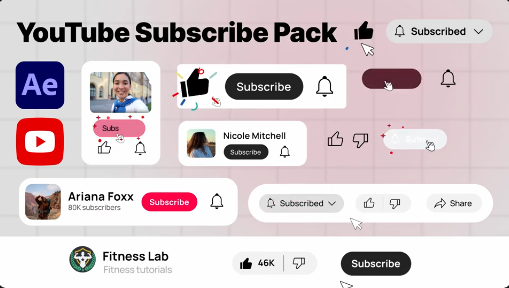
This Free YouTube Subscribe After Effects Template provides a convenient starting point for adding animated subscription prompts to your video projects. Instead of creating every graphic and animation from scratch, you can use an existing template and adapt it to your preferred editing style. Depending on the original template's features, you may be able to customize the text, colors, timing, animation elements, and other visual details to match your channel's branding.
Whether you create gaming videos, tutorials, product reviews, vlogs, entertainment content, educational videos, or cinematic edits, a well-placed subscribe animation can make your call to action more noticeable and visually appealing.
A Free Subscribe Button Animation can include animated text, a button-style graphic, a notification bell, or other visual elements, depending on the design of the original template. These elements can help communicate the desired action quickly, particularly when the animation is easy to understand and does not remain on screen for too long.
For the best viewing experience, place the animation where it complements the video's pacing. Avoid covering important subjects, subtitles, or other essential information. A clear and concise call to action is often more effective than a large graphic that stays on screen for an extended period.
The template can also work for technology reviews, filmmaking channels, cooking videos, fitness content, music-related videos, reaction videos, and entertainment channels. New creators can use a consistent visual style to make their videos look more polished, while established channels can incorporate subscription prompts into their existing branding.
Video editors who work with multiple clients may also find subscribe animations useful when preparing branded YouTube content. The graphic can become part of a repeatable editing workflow, helping maintain consistency across a series of videos.
A Free YouTube Outro Template can be combined with a logo, channel name, social media handles, or end-screen layout when the project supports those elements. This can help create a more cohesive closing sequence and guide viewers toward additional content.
For an outro, consider keeping the design clean and leaving enough visual space for YouTube end-screen elements when required. Ensure that the animation does not compete with recommended videos or other clickable areas.
For vertical videos, check whether the original project supports portrait dimensions or can be adapted without damaging the composition. Keep important text and graphics within the visible area, allowing for platform interface elements that may cover parts of the screen.
When repurposing an animation for Instagram Reels, Facebook videos, or other platforms, adjust the wording to suit the destination. A YouTube-specific prompt may be appropriate when promoting a YouTube channel, while other content may benefit from a more general follow or visit prompt.
Depending on the template's features, you may be able to change the wording, adjust colors, modify the animation timing, replace placeholder graphics, or adapt the composition to your channel's visual identity. Review the project structure and included instructions before editing to understand which elements are designed to be changed.
For a professional result, use readable text and colors that provide sufficient contrast against the background. Keep the animation consistent with your channel logo, typography, and general visual style. If the template contains a notification bell or other interface-inspired graphics, make sure they remain visually clear at the final video resolution.
Before starting, check the required After Effects version, any plugins or fonts, included assets, and the template's licensing conditions. Editing capabilities can vary depending on how the original project was created.
Keep it brief: A short animation can communicate the message without interrupting the viewing experience.
Maintain brand consistency: Use colors, typography, and visual elements that complement your channel's existing identity.
Avoid covering important content: Position the animation so that it does not hide faces, demonstrations, subtitles, or essential details.
Check readability: Make sure the text and button remain clear on both desktop and mobile screens.
Use suitable audio: If the animation includes a sound effect, ensure that it matches the video's tone and is balanced with the existing audio. Confirm that you have permission to use any included sound assets.
Preview before exporting: Check the animation's timing, alignment, transparency, and visual quality in the finished composition.
Keep calls to action natural: Encourage viewers to subscribe without repeatedly interrupting the content or making the video feel overly promotional.
It is suitable for personal channels, branded content, educational projects, product demonstrations, entertainment videos, and client work, provided the asset's license permits the intended use. With thoughtful placement and customization, a subscribe animation can become a consistent part of your channel's video identity.
Give your videos a polished call to action with a subscribe animation that complements your channel's style. Whether you are building a new YouTube channel, improving your video outro, or creating content for clients, a well-designed subscription prompt can help make your videos feel more consistent, engaging, and professional.
This Free YouTube Subscribe After Effects Template provides a convenient starting point for adding animated subscription prompts to your video projects. Instead of creating every graphic and animation from scratch, you can use an existing template and adapt it to your preferred editing style. Depending on the original template's features, you may be able to customize the text, colors, timing, animation elements, and other visual details to match your channel's branding.
Whether you create gaming videos, tutorials, product reviews, vlogs, entertainment content, educational videos, or cinematic edits, a well-placed subscribe animation can make your call to action more noticeable and visually appealing.
Make Your YouTube Videos More Engaging
A subscribe animation gives viewers a clear reminder to follow your channel for future uploads. It can appear during a natural pause in the video, after a useful tutorial section, near the end of a review, or during the closing sequence. When used thoughtfully, it supports your content rather than distracting viewers from it.A Free Subscribe Button Animation can include animated text, a button-style graphic, a notification bell, or other visual elements, depending on the design of the original template. These elements can help communicate the desired action quickly, particularly when the animation is easy to understand and does not remain on screen for too long.
For the best viewing experience, place the animation where it complements the video's pacing. Avoid covering important subjects, subtitles, or other essential information. A clear and concise call to action is often more effective than a large graphic that stays on screen for an extended period.
Perfect for YouTubers and Content Creators
This Free YouTube Subscribe Template is suitable for creators across many content categories. Gaming channels can use subscribe animations during gameplay highlights, tutorials, and livestream recordings. Vloggers can include them in travel videos, daily updates, lifestyle content, and personal stories. Educational creators can place a short subscription reminder after a lesson or demonstration.The template can also work for technology reviews, filmmaking channels, cooking videos, fitness content, music-related videos, reaction videos, and entertainment channels. New creators can use a consistent visual style to make their videos look more polished, while established channels can incorporate subscription prompts into their existing branding.
Video editors who work with multiple clients may also find subscribe animations useful when preparing branded YouTube content. The graphic can become part of a repeatable editing workflow, helping maintain consistency across a series of videos.
Use Subscribe Animations in YouTube Intros and Outros
Subscribe animations are particularly useful in video intros and outros. An intro can establish the channel's visual identity, while an outro can remind viewers to subscribe after they have watched the main content. Depending on the animation's design, you may also be able to use it as an overlay within the video rather than as a full-screen sequence.A Free YouTube Outro Template can be combined with a logo, channel name, social media handles, or end-screen layout when the project supports those elements. This can help create a more cohesive closing sequence and guide viewers toward additional content.
For an outro, consider keeping the design clean and leaving enough visual space for YouTube end-screen elements when required. Ensure that the animation does not compete with recommended videos or other clickable areas.
Suitable for Shorts, Reels, and Social Media Videos
Although designed around YouTube subscription prompts, subscribe-style animations can also be adapted for short-form content and other social platforms when the design and usage rights permit it. Creators can incorporate a compact call to action into promotional clips, channel teasers, creator announcements, and social media videos that direct audiences toward their YouTube channel.For vertical videos, check whether the original project supports portrait dimensions or can be adapted without damaging the composition. Keep important text and graphics within the visible area, allowing for platform interface elements that may cover parts of the screen.
When repurposing an animation for Instagram Reels, Facebook videos, or other platforms, adjust the wording to suit the destination. A YouTube-specific prompt may be appropriate when promoting a YouTube channel, while other content may benefit from a more general follow or visit prompt.
Customization in Adobe After Effects
This Free After Effects Subscribe Animation Template is intended for Adobe After Effects, subject to the compatibility requirements of the original project. After Effects offers tools for editing animated text, motion graphics, compositing, and visual effects, making it suitable for creating and customizing channel graphics.Depending on the template's features, you may be able to change the wording, adjust colors, modify the animation timing, replace placeholder graphics, or adapt the composition to your channel's visual identity. Review the project structure and included instructions before editing to understand which elements are designed to be changed.
For a professional result, use readable text and colors that provide sufficient contrast against the background. Keep the animation consistent with your channel logo, typography, and general visual style. If the template contains a notification bell or other interface-inspired graphics, make sure they remain visually clear at the final video resolution.
Before starting, check the required After Effects version, any plugins or fonts, included assets, and the template's licensing conditions. Editing capabilities can vary depending on how the original project was created.
Tips for Using YouTube Subscribe Animations Effectively
Choose the right timing: Display the animation at a natural point in the video, such as after a useful tip, an entertaining moment, or the main content.Keep it brief: A short animation can communicate the message without interrupting the viewing experience.
Maintain brand consistency: Use colors, typography, and visual elements that complement your channel's existing identity.
Avoid covering important content: Position the animation so that it does not hide faces, demonstrations, subtitles, or essential details.
Check readability: Make sure the text and button remain clear on both desktop and mobile screens.
Use suitable audio: If the animation includes a sound effect, ensure that it matches the video's tone and is balanced with the existing audio. Confirm that you have permission to use any included sound assets.
Preview before exporting: Check the animation's timing, alignment, transparency, and visual quality in the finished composition.
Keep calls to action natural: Encourage viewers to subscribe without repeatedly interrupting the content or making the video feel overly promotional.
Who Can Benefit from This Free Template?
The Free YouTube Subscribe Template is useful for YouTubers, video editors, streamers, gaming creators, educators, vloggers, digital marketers, social media managers, and freelance motion designers. Beginners can use a template-based workflow to explore animated graphics, while experienced editors can incorporate subscribe prompts into a more extensive video production process.It is suitable for personal channels, branded content, educational projects, product demonstrations, entertainment videos, and client work, provided the asset's license permits the intended use. With thoughtful placement and customization, a subscribe animation can become a consistent part of your channel's video identity.
Explore Free YouTube Subscribe Templates on Freevideofx
Looking for a Free YouTube Subscribe Animation, an animated subscribe button, or a motion graphics template for your next video? Freevideofx helps creators discover video editing resources and creative assets for a variety of production needs. Explore the available template details, review software compatibility, and check the licensing terms before incorporating an asset into your content.Give your videos a polished call to action with a subscribe animation that complements your channel's style. Whether you are building a new YouTube channel, improving your video outro, or creating content for clients, a well-designed subscription prompt can help make your videos feel more consistent, engaging, and professional.


